Master Java from Beginning (Zero to Hero)
First Step into the world of JAVA
Welcome to the programming world. I'm going to take you to a brand-new one called "Java". In general, learning Java is not difficult, but grasping topics thoroughly is what sets you apart from others. We are going to discover the following topics in this blog:
The Origin of Java.
Why Java and what is the use of Java?
Our First code of Java.
Before getting started, I wanted to remind you that the first step is always the hardest. Don't be afraid if you come across any terms you are unfamiliar with; I have provided in-depth explanations for all of them. However, for some terms, I have chosen not to provide in-depth explanations here instead, you will understand those keywords much more clearly in future blogs once we have covered other topics.
The Origin of Java
If you have some knowledge of Programming Then Before Java we have a programming language called CPP which is a derivative of another Programming Language C Now you might think that why this evolution is taking place well The answer for this is Computer Languages evolve for two reasons
To Adapt to changes in the real world
To implement the art of Programming
Before we start the discussion about Java let's see the evolution of CPP. CPP is the updated version of C generally CPP simply means C with classes and objects. you can run a normal C program in a CPP compiler the compiler will not show any type of errors for you. CPP is a Platform Dependent Language (i.e. Natively executable code). Now you might think that why CPP is coming in between Here's the answer for that CPP is Object Oriented Programming Language Though it is not a purely Object Oriented Programming Language. It is the first Language that introduced Classes and Objects in this Programming World which is the reason why it is important to know about it. Now you may be thinking that Java is the replacement for CPP but no Java is not designed to replace CPP, Java was designed to solve some set of problems and CPP was designed to solve another set of problems.
Why Java and What is the Use of Java
Java is not a replacement for any other Programming Language Java has its Functionalities which makes it the Best Language. Don't mind me bringing the CPP to this page to answer the Question Why Java? we need a comparison and here we are comparing Java with CPP [Only the Bests will have the biggest rivalries]. CPP is the first Object Oriented Language therefore it does not have all the Functionalities The trouble with CPP is that they are designed to compile for a specific target CPP compiler is targeted for CPU. The problem is compilers are expensive and time-consuming to create. and as a updation programmers worked on a portable, platform-independent language that could be used to produce code that would run on a variety of CPUs under different environments. This work had ultimately lead to JAVA. JAVA is mostly used in Android Development Most of Android applications and Web-Based Applications, Gaming Applications like Minecraft, Asphalt 6 etc use JAVA.
Our First code of Java
First Let's see the Basic Code of Java.
public class Main
{
    public static void main(String[] args)
    {
        System.out.println("Hello World!");
    }
}
The Above demonstrated code is the basic level Java code. Now let's analyse the above code step by step.
public class Main
The Keyword used in this line is public class which describes a new class being defined. public is an access modifier Normally in day-to-day life we use the word public very commonly for example This political party conducted a meeting publicly without any permission. same as a real-life example when a class is given public as a prefix then that member can be accessed by code outside the class also. you will understand this concept more deeply in future codes in which we will use the keywords public, and private. Main is an identifier it is the name of the class and also the file name which we created with the .java extension in this case my file name is Main. Next, The entire class definition which includes all members (i.e. functions) will be in between the opening '{' and closing '}' curly braces.
The next line of our code is as below:
public static void main(String[] args)
All the Java Programs start execution from main() method which is called by JVM(Java Virtual Machine) also Java is case sensitive. In the Above line Main is used for class definition and here main() is a function we will discuss this naming convention later on. The Keyword static allows main() to be called without creating a particular instance of a class. We use static mainly for using any class without creating an object. this is the main reason to use static here because JVM calls the main() function first without executing any other part of our code. The next keyword we have is void means nothing here in Java void is used when there is nothing to return from a member. if you feel it is confusing then calm down you will understand everything on the way. wait let me explain this line with a real-life example, when you wanted to start a new work what is the first thing you do? I got you The first thing we do is we will keep a starting point for example when I wanted to go to a movie I wanted to start from my home and then to the theatre in between there will be many things that come but my starting point is constant. same as in this example in JAVA main() is that starting point. Now String[] args args is stored as a parameter for the main() method which is an instance of class String. Here args receives any command-line arguments when the program is executed. here you can use any other variable name in place of args, args is just a normal variable. in the next line, we have { curly braces in which we will write the body of our main() method. In this line System. out shows a static variable of System class that represents the standard output stream we will discuss this System class in detail in future. .println shows print stream, .println is used to display the output here .println is used to display the String "Hello World!".
Roadmap
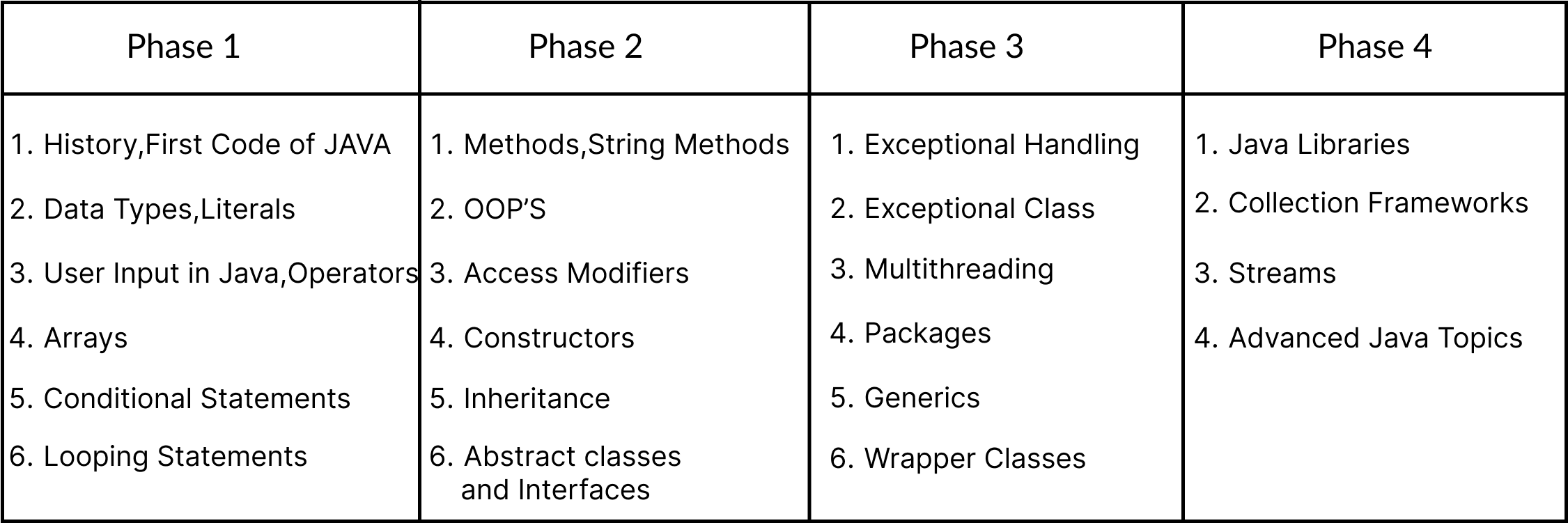
Before calling this post a wrap, I wanted to provide you with a roadmap of what this series will teach us in the future. I've divided this series into 4 phases to add intrigue. Phase 1 covers fundamental programming principles that apply to all programming languages, Phase 2 covers topics specific to Java's Object-Oriented Language, Phase 3 covers all of the Important topics of Java, and Phase 4 covers advanced Java concepts. At last, I will explain what are the things we can do about GUI, SWING etc...
Here is the list of the things we are seeing in the future.
Conclusions
With that, we can wrap up this blog. Let's review what we learned. In this section, we learned about Java's history and development. After that, we learned how to utilise Java and why it is important. I believe you have the answer to this question, but if not, I'm confident you will find it in the process. We finally arrived at the first Java code, which we examined in detail for each keyword. I know it can be challenging to understand all of the keywords as well as what is happening and why, but keep in mind that you are only at the beginning of the process and you will eventually understand everything changemakers.